
This week we are excited to share the improvements and fixes that come along with QC One App 20.15.0, which will be released Tuesday July 7.
Below you’ll find a detailed overview of what’s new, improved, and important to know for this release.
🚀 QC One App: Release 20.15.0
- Status: Update via App Store
- Release Date: July 7 2026
- Version: 20.15.0
- Platforms: App (iOS & Android)
- Distribution: Cloud
🚀 Inspection Sync Range (New)
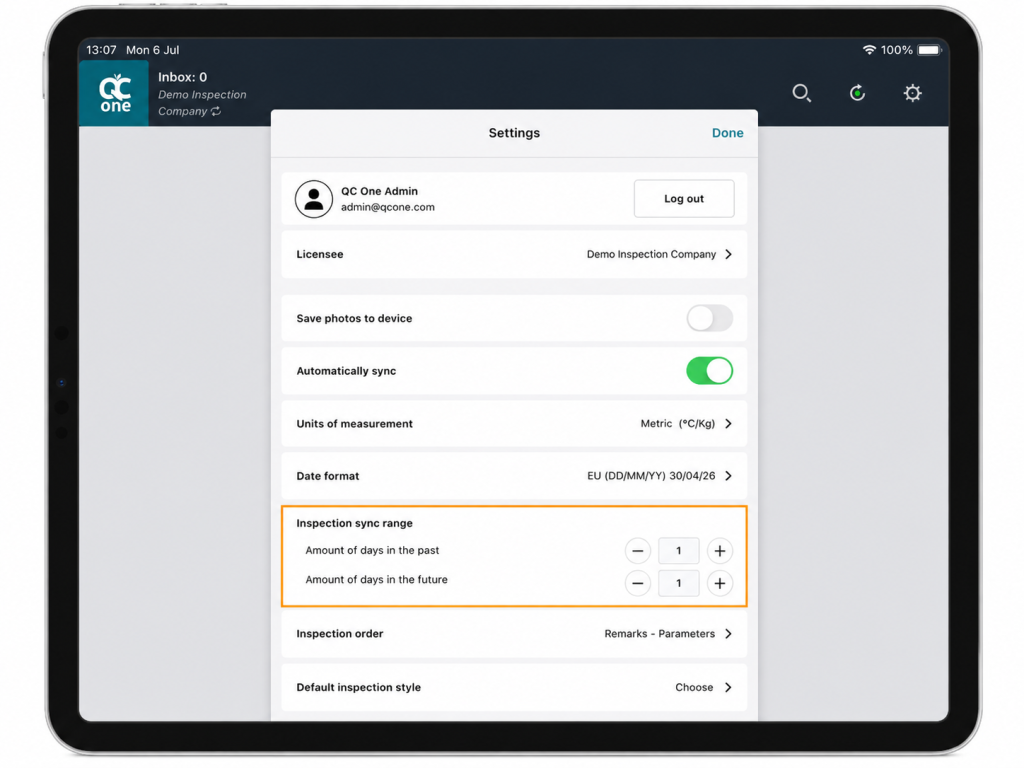
We’ve introduced a new Inspection Sync Range setting to give inspectors more control over how many inspections are synchronized to their device. For users working with a high volume of inspections, reducing the synchronization window can significantly improve sync performance by limiting the number of inspections that need to be downloaded.
The Inspection Sync Range lets you choose how many days of inspections are synchronized to your device. You can set the range from 1 day in the past and 1 day in the future up to 30 days.
Adjust the sync range to match the way you work:
- Increase the range (up to 30 days) if you manage a smaller number of inspections and want a broader overview of upcoming and recent inspections.
- Decrease the range if you handle a high volume of inspections and want to focus on the most relevant work. A smaller sync range also reduces the number of inspections that are synchronized, which can improve synchronization performance.
Choose the sync range that best fits your workflow and operational needs.
Note: By default, QC One synchronized inspections within a 14-day window. This new setting allows you to tailor the sync timeframe to your own needs.
Other/General Improvements
- Specification Manager remark blocks now support 2 decimal points.
- New user setting for hiding time stamp in the Inspections Inbox
- User application language preferences are now remembered even after the application was fully closed.
- Completed Specification Manager inspections are now automatically removed from all devices. Users must still perform a sync to retrieve the latest changes.
- On tablet devices, users can now press and hold the Delete key on the numeric keypad to clear the entire cell
Bug Fixes
- Fixed camera view crashes occurring on iPhone 17 devices
- Removed the ‘Created by Inspector’ and ‘Quantification Type’ unit data fields from Specification Manager inspections.
- Resolved some conflicts where the on-screen keyboard could obstruct input view.
Thank You
We appreciate your continued feedback and support as we work to make QC One Portal & App better for everyone. If you have any questions or need assistance, please don’t hesitate to reach out to our support team.